A simple bar plot
-
A bar plot is used to compare values across different categories using rectangular bars. The height (or length) of each bar represents the corresponding value, making it easy to compare quantities between categories.
-
   import matplotlib.pyplot as plt
   cities = ['Beijing', 'Shanghai', 'Guangzhou', 'Shenzhen']
   population = [2180.00 , 2485.41, 1910.10, 1824.85]
   plt.bar(cities, population, color = ["green","blue","hotpink","violet"], width=0.5)
   plt.title('City population jjuni.com')
   plt.xlabel('cities')
   plt.ylabel('population')
   plt.show()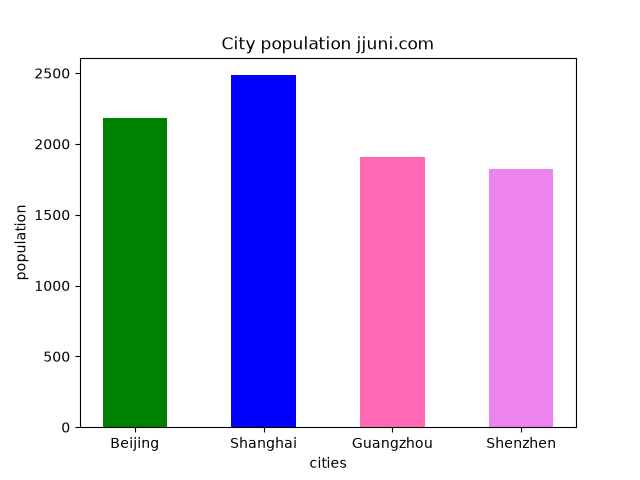
-
Multiple Bar Plots
-
Multiple bar plots allow different datasets to be displayed side by side for each category, making comparisons easier.
-
  import matplotlib.pyplot as plt
  import numpy as np
  cities = ['Beijing', 'Shanghai', 'Guangzhou', 'Shenzhen']

  p2000 = [1381.9, 1640.77, 700.69, 701.24]
  p2025 = [2180.00 , 2485.41, 1910.10, 1824.85]

  x = np.arange(len(cities))        # 0, 1, 2, 3: one group per quarter
  width = 0.38                        # width of each bar

  fig1, ax = plt.subplots(1,1, figsize=(7, 7))
  bars1 = ax.bar(x - width / 2, p2000, width, color ='g', label="2000")   # shift left
  bars2 = ax.bar(x + width / 2, p2025, width, color ='violet',label="2025")   # shift right
  ax.bar_label(bars1, padding=2)
  ax.bar_label(bars2, padding=2)

  ax.set_xticks(x, cities)          # labels in the middle of each group
  ax.set_ylabel("population")
  ax.set_title(" City population jjuni.com")
  ax.legend()
  plt.show()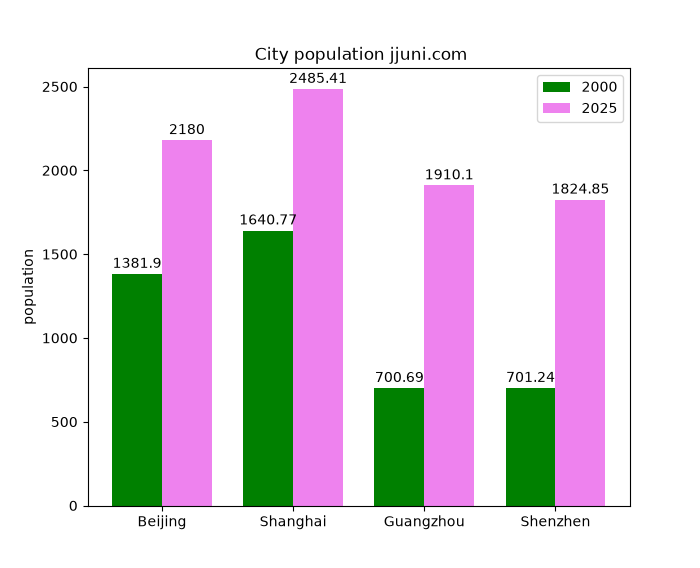
The trick is the x positions: np.arange() gives one position per group, and each series is moved half a bar width to the left or right so the bars touch instead of overlapping.
-
If your data is in a DataFrame, each column becomes a series and each row a group. No offset calculation is needed:
 import matplotlib.pyplot as plt
 import pandas as pd

 df = pd.DataFrame({"2000": [1381.9, 1640.77, 700.69, 701.24], "2025": [2180.00 , 2485.41, 1910.10, 1824.85]},
                  index=['Beijing', 'Shanghai', 'Guangzhou', 'Shenzhen'])
 ax = df.plot(kind="bar", figsize=(7, 7),color =('g','violet' ), rot=0, width=0.8)
 ax.set_ylabel("population")
 ax.set_title("City population jjuni.com")
 for container in ax.containers:
    ax.bar_label(container, fontsize=8)
 plt.show()
-