Line Chart with Annotations
-
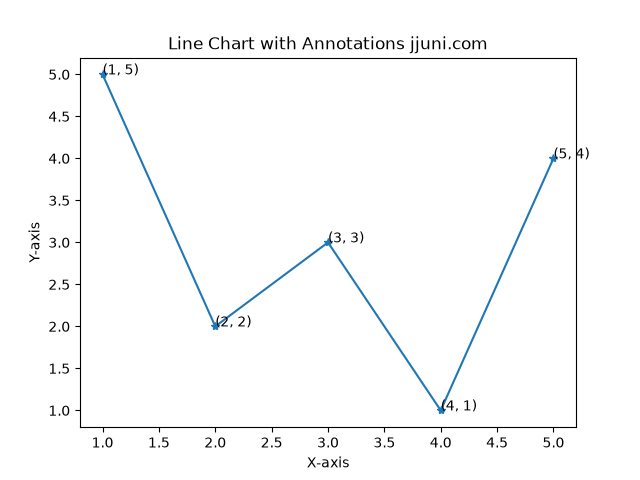
A line chart in Matplotlib is used to display data points connected by straight lines. For adding annotations to a line chart you can use the annotate() function. This function allows you to display additional information such as the exact x and y values directly on the data points, improving clarity and data interpretation.
-
import matplotlib.pyplot as plt import numpy as np x = np.array([1,2,3,4,5]) y = np.array([5,2,3,1,4]) plt.plot(x, y, marker='*', linestyle='-') for xi, yi in zip(x, y): plt.annotate(f'({xi}, {yi})', (xi, yi)) plt.title('Line Chart with Annotations jjuni.com') plt.xlabel('X-axis') plt.ylabel('Y-axis') plt.show() -
-
Multiple Plots on Same Axis
-
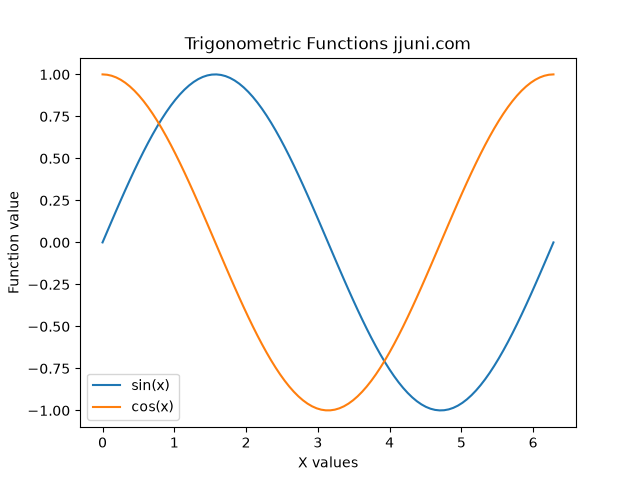
To plot multiple lines on the same axis, you can call the plot() function multiple times before displaying the graph. This approach is useful for comparing different datasets within the same coordinate system.
import numpy as np import matplotlib.pyplot as plt x = np.linspace(0, 2 * np.pi, 100) y1 = np.sin(x) y2 = np.cos(x) plt.plot(x, y1, label="sin(x)") plt.plot(x, y2, label="cos(x)") plt.xlabel("X values") plt.ylabel("Function value") plt.title("Trigonometric Functions jjuni.com") plt.legend() plt.show() -
-