Pie charts in subplots
-
One of the most useful features of Matplotlib is its ability to create multiple subplots within a single figure using the plt.subplots() method. This allows users to display multiple related visualizations side by side, making data analysis more insightful and effective. Subplots in Matplotlib refer to multiple plots arranged within a single figure. The matplotlib.pyplot.subplots() method provides an easy way to create a figure with multiple plots. Given the number of rows and columns, it returns a tuple (fig, ax), where fig is the entire figure object and ax is an array of axes objects representing individual subplots.
-
 import matplotlib.pyplot as plt
 import numpy as np

 labels = ['Beijing', 'Shanghai', 'Guangzhou']

 sizes1 = np.random.randint(1, 10, 3)
 sizes2 = np.random.randint(1, 10, 3)

 fig, axes = plt.subplots(nrows=1, ncols=2, figsize=(10, 5))
 axes[0].pie(sizes1, labels=labels, autopct='%1.1f%%', colors=['lightskyblue', 'lightgreen', 'lightcoral'])
 axes[1].pie(sizes2, labels=labels, autopct='%1.1f%%', colors=['gold', 'lightseagreen', 'lightpink'])

 axes[0].set_title('City charm 2015 jjuni.com')
 axes[1].set_title('City charm 2026 jjuni.com')

 plt.tight_layout()
 plt.show()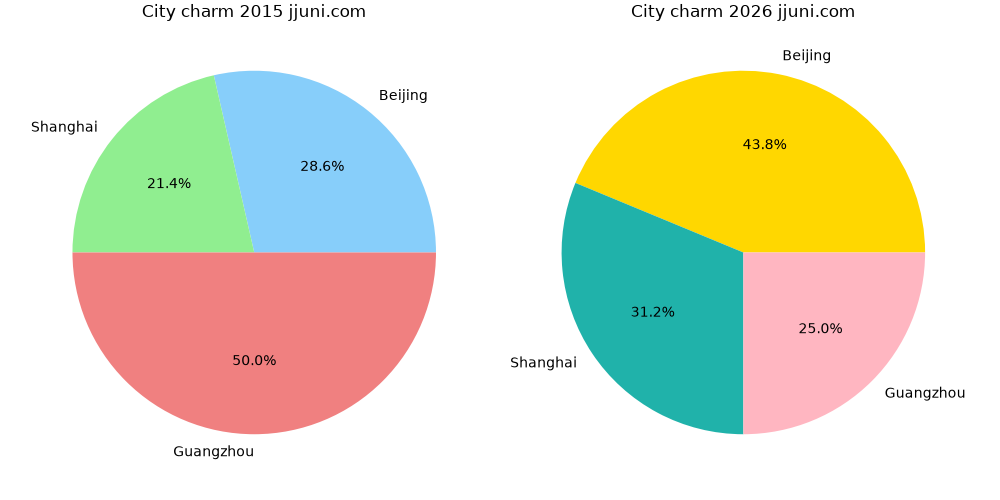
-